


Learning how to write a research question with AI can make the early planning stage faster and more structured. A strong research project usually begins with a strong research question, but turning a broad topic into one that is clear, focused, researchable, and methodologically appropriate can be difficult—especially at the beginning of a thesis, dissertation, or academic project.
AI can help with this stage, but only if you use it as a thinking partner rather than a replacement for academic judgment. In this guide, you will learn how to write a research question with AI step by step, how to avoid common mistakes, and how to evaluate AI-generated questions before using them in real research.
What makes a good research question?
A useful research question should do more than sound academic. It should give your study a clear direction and match the type of evidence you can realistically collect. Purdue OWL’s research guide also emphasizes narrowing a broad topic to a manageable scope before developing the research question.
- Clear: The wording should be understandable and free from unnecessary ambiguity.
- Focused: The question should be narrow enough to investigate within your available time and resources.
- Researchable: You should be able to answer it using data, evidence, documents, observations, experiments, interviews, or another appropriate method.
- Methodologically aligned: A descriptive question should not accidentally become causal, and a comparative question should identify what is being compared.
- Relevant: The question should address a meaningful academic, practical, or theoretical problem.
- Feasible: The required participants, data, equipment, access, and analysis should be realistic for your study.
How AI can help you develop a research question
AI is useful for exploring alternatives quickly. It can take a broad topic and suggest different ways to frame it—for example as a descriptive, comparative, correlational, exploratory, or other type of research question.
The important point is that the AI should work from your research decisions. If you simply type “give me five research questions about artificial intelligence,” the model has to guess your level, field, context, methodology, population, and intended type of study. That often produces questions that sound polished but are too broad or methodologically inconsistent. If you want a structured starting point while following this guide, try the free Noor AI Academy Research Question Generator.
A better workflow is to define those decisions first and then ask AI to generate alternatives within those boundaries.
Step 1: Start with the research topic—not the final question
Write the subject you want to investigate in one clear sentence or phrase. At this stage, it can still be broad.
Example topic: Optimization of search algorithms in nonlinear data structures.
Do not force yourself to produce the final question immediately. First make sure the central concept of the study is clear. This is important because AI systems can easily drift from your topic if the original scope is vague.
Step 2: Define the academic and research context
Before generating questions, identify the context that should shape them. Depending on your project, this can include:
- Research field or discipline
- Academic level, such as undergraduate, master’s, or doctoral research
- Population, setting, institution, country, dataset, system, or other context
- Available time and resources
- Any important boundaries you do not want the question to exceed
These details help prevent AI from inventing populations, variables, methods, technologies, or contexts that you never intended to study.
Step 3: Choose the research approach and question type
This is one of the most important steps. Different question types lead to different forms of evidence and analysis.
| Question type | Typical purpose | Example direction |
|---|---|---|
| Descriptive | Describe characteristics, patterns, status, or distribution | What are the characteristics of…? |
| Comparative | Compare two or more groups, methods, conditions, or systems | How does X differ from Y…? |
| Correlational | Examine an association between variables | What is the relationship between X and Y…? |
| Exploratory | Investigate a topic where the important dimensions may not yet be clear | How is X experienced or understood…? |
Do not choose a question type simply because it sounds sophisticated. Choose it because it matches the research problem and the evidence you can collect. Purdue’s graduate-writing guidance similarly notes that a research question should be investigated with data, methods, and methodologies recognized as valid in the relevant field. See Purdue OWL’s “Articulating a Research Agenda” guide.
Step 4: Ask AI for multiple candidates—not one “perfect” question
One of the best uses of AI is generating several candidate questions that you can compare. Instead of asking the model to decide your final research question, ask it to give you several alternatives within the same methodological boundaries.
For example, a useful instruction might include your topic, field, academic level, research approach, question type, context, and the number of questions you want.
Try Noor AI Academy’s Research Question Generator
Our free tool structures these decisions for you instead of making you write a long prompt from scratch. You can choose the research field, academic level, approach, question type, context, number of questions, and additional research outputs in English, Turkish, or Arabic.
Step 5: Check every AI-generated question for scope drift
AI often adds concepts that sound reasonable but were never part of the original research topic. This is one of the easiest mistakes to miss because the new wording may still sound academic.
Suppose your topic is about optimization of search algorithms in nonlinear data structures. An AI-generated question about “search algorithm performance across different hardware environments” may sound relevant, but it introduces a new dimension—hardware environments—that you did not define.
When reviewing a generated question, ask:
- Did the AI add a new variable?
- Did it add a new population or setting?
- Did it change what is being optimized, compared, measured, or explained?
- Did it turn a descriptive study into a causal or relational study?
- Did it introduce a method or metric I did not specify?
Step 6: Test the question for feasibility
A research question can be academically interesting and still be impossible for your project. Before accepting it, check what would actually be required to answer it.
- Can you access the necessary data or participants?
- Can you measure the concepts in the question?
- Do you have the required tools, software, laboratory facilities, or datasets?
- Can the study be completed within your timeline?
- Are there ethical or privacy issues?
- Does your methodology allow you to make the kind of claim implied by the question?
Step 7: Refine the wording yourself
Do not treat the AI output as finished text. The final wording should reflect your own understanding of the study.
Remove vague words, unnecessary academic jargon, and concepts that are not operationally meaningful. Make sure the central topic remains visible and that the question does not promise more than your design can answer.
How to write a research question with AI: the 7-step workflow
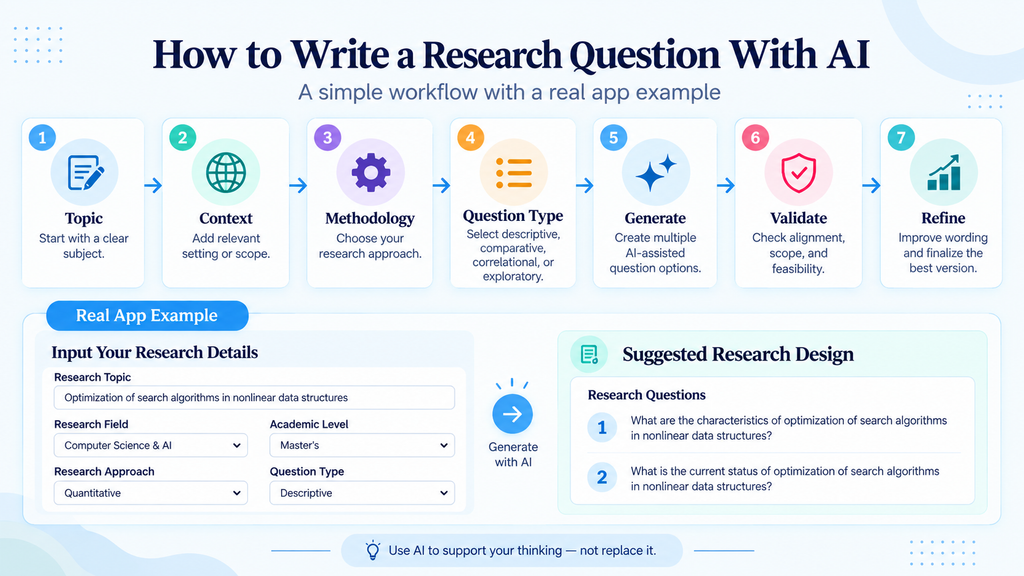
- Write your research topic.
- Define the field, academic level, and context.
- Select the research approach.
- Select the question type.
- Generate several candidate questions.
- Reject questions that introduce new concepts or change the study design.
- Check feasibility and available evidence.
- Refine the strongest candidate in your own words.
- Discuss the final version with your supervisor, research team, or relevant academic reviewer.
Common mistakes when using AI for research questions
1. Using a very broad prompt
“Give me research questions about AI in education” leaves too many decisions to the model. The results may be interesting but inconsistent with your real study.
2. Choosing the most impressive-sounding question
Complex wording does not make a question better. A simpler question that can actually be answered is usually more useful.
3. Letting AI invent variables or methods
Always compare the output with your original topic and design. New concepts should be added because you intentionally chose them—not because the model introduced them automatically.
4. Treating the generated question as academically validated
AI can help formulate possibilities, but it does not know whether your institution, discipline, supervisor, ethics process, or dataset makes a question suitable.
Final research question checklist
Before you use an AI-assisted research question, check the following:
- Does it clearly represent my original research topic?
- Is it specific enough to guide a real study?
- Does the question type match my research approach?
- Can I collect or access the evidence needed to answer it?
- Did AI introduce any concept I did not intend to study?
- Is the wording clear and academically natural?
- Is the scope realistic for my academic level and timeline?
- Have I reviewed it with appropriate academic judgment?
Frequently asked questions
Can AI write my research question for me?
AI can generate and refine candidate questions, but the final research question should be selected and evaluated by you. It needs to reflect your actual research problem, methodology, evidence, feasibility, and academic requirements.
Should I use ChatGPT or Gemini to generate research questions?
General-purpose AI assistants can both help, but the quality of the result depends heavily on the structure of your instructions. A dedicated workflow can make the process easier by asking for the methodological information before generation.
How many research questions should I generate?
During brainstorming, generating several alternatives can be useful. Your final study may use one main research question, several sub-questions, or another structure depending on the discipline and research design.
Use AI to improve the process—not replace the thinking
The most useful role for AI is not to make the research decision for you. It is to help you explore options, notice alternative formulations, and move more efficiently from a broad topic toward a researchable question.
Start with your own topic and methodological choices, generate several candidates, then critically evaluate the results. That combination of AI assistance and human academic judgment is far more reliable than asking an AI system for a “perfect” research question in a single prompt.






Comments 2