
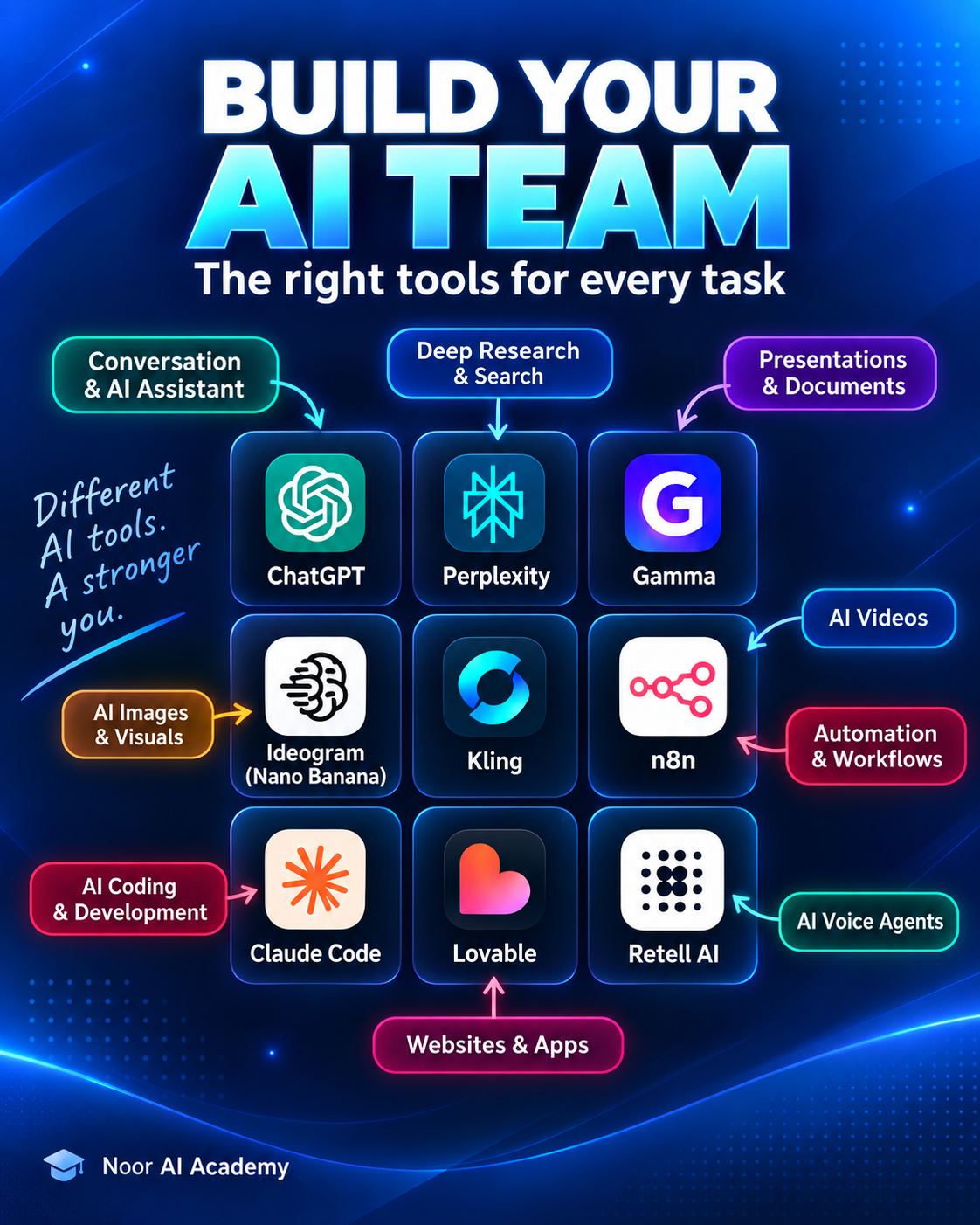
One AI tool is rarely the best choice for every task. A better approach is to build a small AI team—a practical AI stack where each tool has a clear role in your workflow.
In this guide, we will turn the idea behind the Noor AI Academy carousel into a complete workflow for research, writing, presentations, visual creation, video, automation, coding, websites, and voice agents.
You do not need every tool in this article. The goal is to choose the smallest combination that solves your real problem.
What Is an AI Stack?
An AI stack is a group of AI tools that work together across different parts of a task. Instead of forcing one assistant to research, write, design, code, automate, and produce media, you assign each part to the tool that fits it best.
A simple stack might look like this:
Research → Plan → Create → Publish → Automate
For a student, that stack may focus on research and presentations. For a content creator, it may focus on scripts, visuals, video, and publishing. For a builder or founder, it may expand into websites, automation, code, and AI agents.
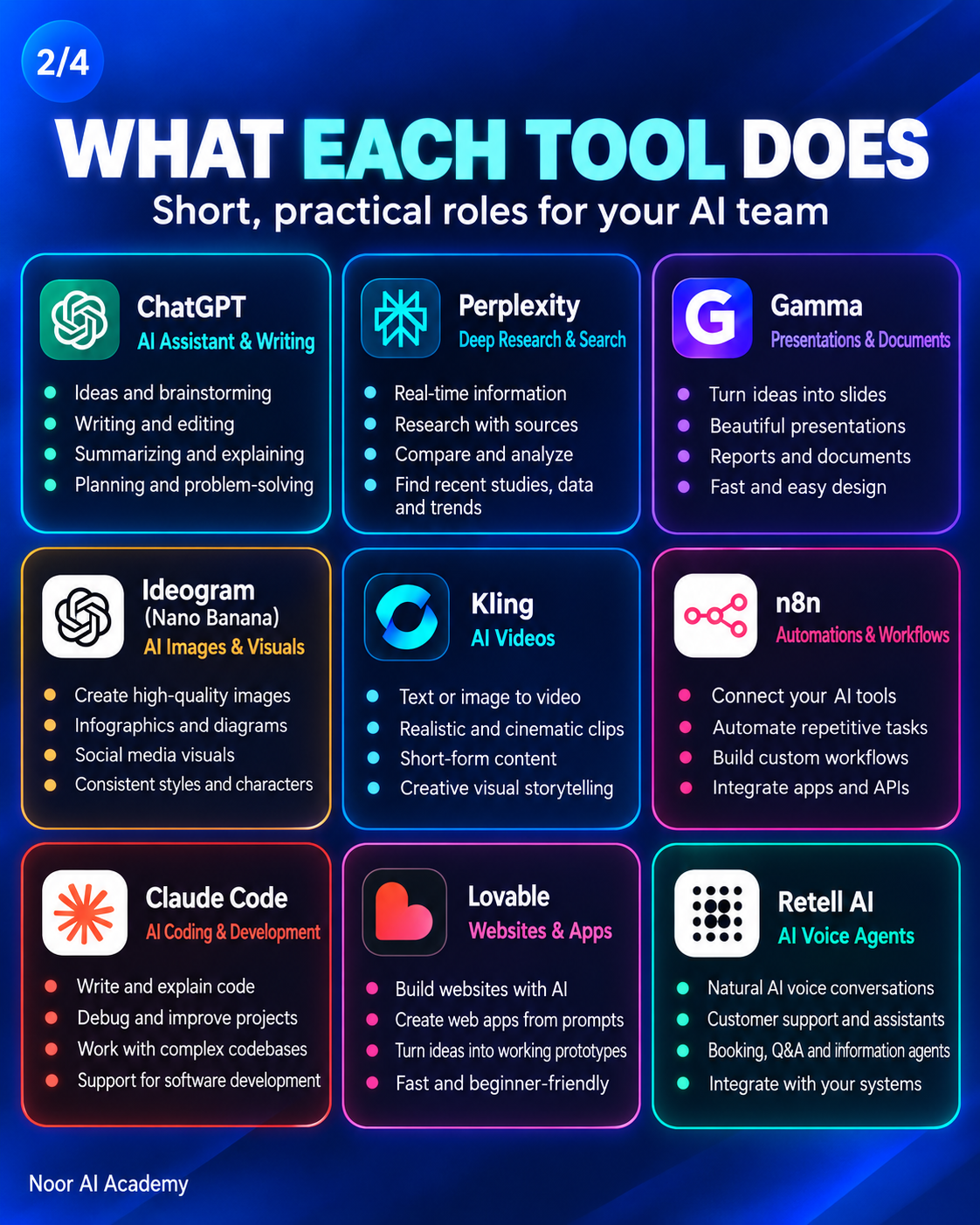
Your AI Team: What Each Tool Can Do
ChatGPT — AI Assistant, Writing and Planning
ChatGPT can sit at the center of the workflow. Use it for brainstorming, outlining, writing, editing, summarizing, explaining difficult ideas, planning projects, and turning rough ideas into structured tasks.
It is especially useful when you need one place to think through a project before passing parts of the work to more specialized tools.
Perplexity — Research and Search
Perplexity is useful when the workflow begins with finding information, comparing sources, identifying recent developments, or collecting material for a research or content project.
For academic work, source checking still matters. AI-assisted research should help you discover and organize evidence, not replace reading the original source.
Gamma — Presentations and Documents
Gamma can turn structured ideas into presentations, reports, and visual documents. It is useful when the content already exists but you need to package it into a clear presentation quickly.
Ideogram — AI Images and Visual Content
Ideogram can support thumbnails, posters, social visuals, concept images, and other visual assets. For educational content, it can also help create simple visual explanations, diagrams, and supporting graphics.
Note: AI image platforms change quickly, so the best image tool may depend on the style, text rendering, consistency, and workflow you need.
Kling — AI Video
Kling can be used for text-to-video and image-to-video workflows, including short cinematic clips and social content. It fits naturally after the script and visual-planning stages.
Video generation is only one part of the workflow. A good result still depends on the source image, prompt, shot design, duration, and final editing.
n8n — Automation and Workflows
n8n connects tools and removes repetitive manual steps. It can move information between apps, trigger workflows, call APIs, process AI outputs, create drafts, and support larger content or business systems.
Automation works best after the manual workflow is already clear. First prove that the process works; then automate the repetitive parts.
Claude Code — AI Coding and Development
Claude Code can help with software development tasks such as writing code, understanding a codebase, debugging, improving existing projects, and supporting more complex development work.
For beginners, the best use of an AI coding assistant is not to let it do all the thinking. Ask it to explain decisions, show alternatives, and help you understand the code you are building.
Related: Learn Coding With AI Without Letting the Agent Do All the Thinking.
Lovable — Websites and Web Apps
Lovable can turn product ideas and prompts into website or web-app prototypes. It is useful when you want to move quickly from an idea to something interactive that can be tested and improved.
Retell AI — Voice Agents
Retell AI is designed for voice-agent workflows such as AI phone assistants, information agents, support flows, and other conversational voice experiences.
Voice agents become more useful when connected to the rest of the stack—for example, a database, automation workflow, scheduling system, or application backend.
Example AI Workflow: From Idea to Finished System
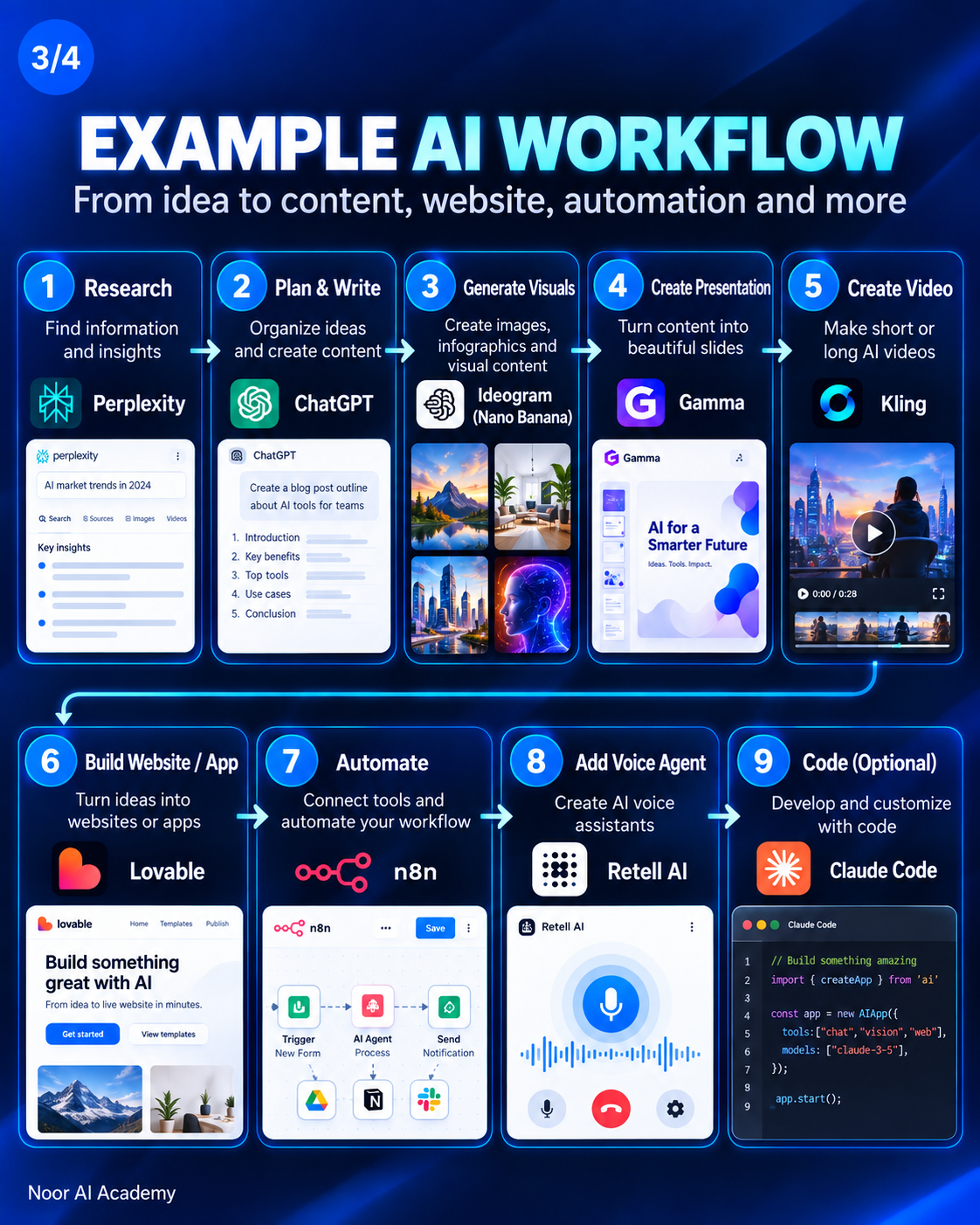
The carousel shows a nine-step example. You do not need to use every stage, but it demonstrates how specialized tools can become one connected workflow.
- Research — Perplexity: collect information, sources, trends, and background.
- Plan and write — ChatGPT: organize ideas, build an outline, write scripts or draft content.
- Generate visuals — Ideogram: create supporting images, thumbnails, infographics, or concepts.
- Create a presentation — Gamma: turn the structured content into slides or a visual report.
- Create video — Kling: transform ideas and visuals into short or long-form AI video.
- Build a website or app — Lovable: move the idea into an interactive product or web experience.
- Automate — n8n: connect the tools and automate repetitive handoffs.
- Add a voice agent — Retell AI: add conversational voice functionality where it solves a real user need.
- Code when needed — Claude Code: customize the system, build integrations, and handle tasks that need deeper development.
The key lesson is that the workflow should decide the tools—not the other way around.
3 Ready AI Stacks to Start With
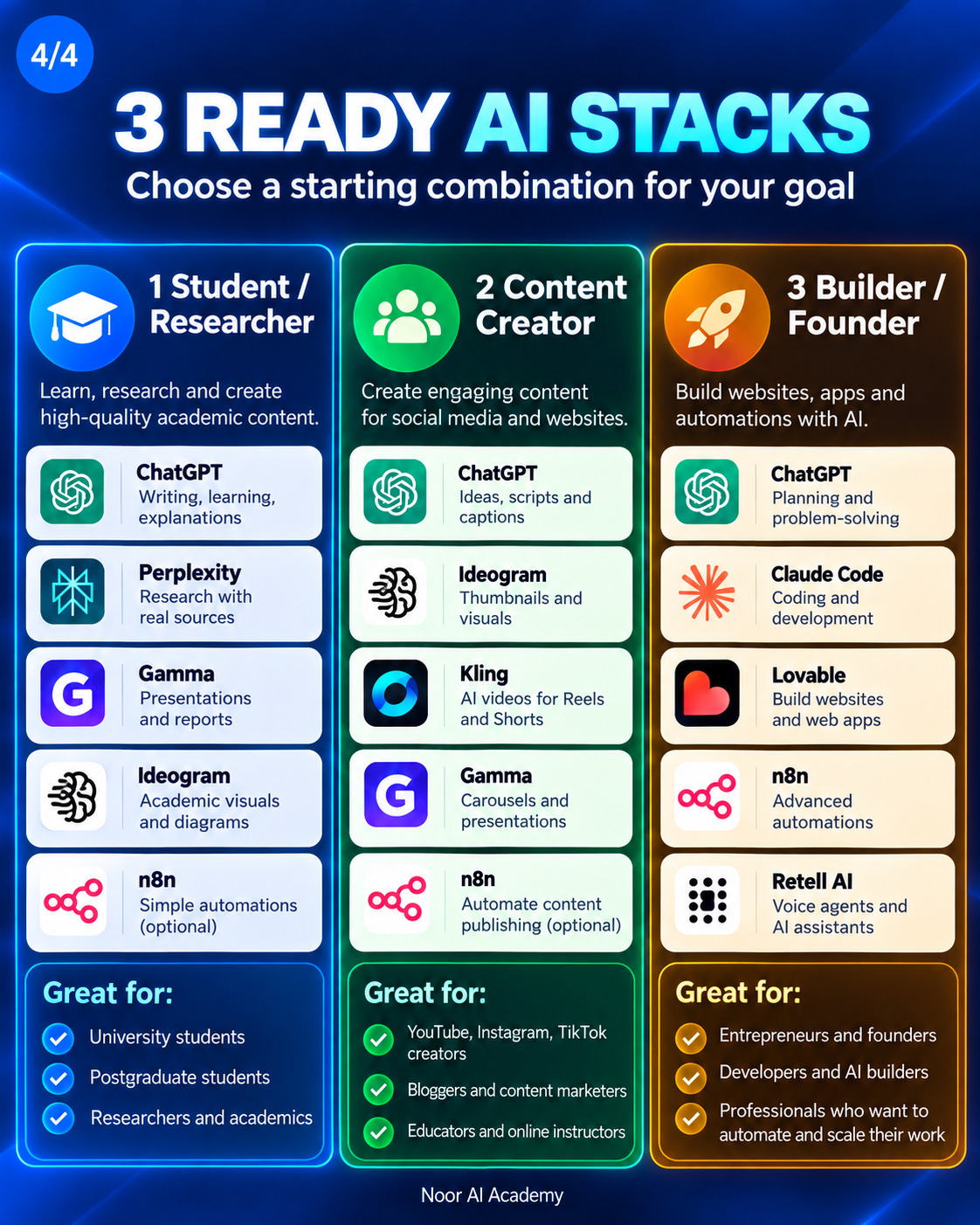
1. Student / Researcher Stack
A practical starting combination:
- ChatGPT: writing, learning, explanations, and planning
- Perplexity: research and source discovery
- Gamma: presentations and reports
- Ideogram: academic visuals and diagrams
- n8n: optional simple automation as your workflow grows
This stack fits university students, postgraduate students, researchers, educators, and academics who need to move from information to organized academic output.
For a deeper study workflow, see How to Study With AI Without Letting AI Do the Thinking for You and How to Write a Research Question With AI.
2. Content Creator Stack
- ChatGPT: ideas, scripts, captions, and content planning
- Ideogram: thumbnails, social graphics, and visual concepts
- Kling: AI video for Reels, Shorts, and visual storytelling
- Gamma: carousels, presentation-style content, and visual documents
- n8n: optional content publishing and repurposing automation
This stack is a good starting point for YouTube creators, Instagram and TikTok creators, bloggers, content marketers, educators, and online instructors.
If video is a major part of your workflow, you may also want to explore our Higgsfield AI Complete Guide and Google Flow for AI Video Creation.
3. Builder / Founder Stack
- ChatGPT: planning, product thinking, and problem-solving
- Claude Code: coding and development
- Lovable: websites and web-app prototypes
- n8n: advanced workflow automation
- Retell AI: voice agents and conversational assistants
This stack is suited to founders, developers, AI builders, and professionals who want to build, connect, automate, and scale digital systems.
Do You Need All of These AI Tools?
No.
A larger AI stack is not automatically a better one. More tools can also mean more subscriptions, more context switching, more maintenance, and more opportunities for errors.
A better approach is:
Start with one real task → choose the minimum tools → test the workflow → automate only what repeats.
If ChatGPT alone solves the task well, keep it simple. Add another tool when it has a clear purpose.
How to Choose the Right AI Stack
Before adding a new tool, ask four questions:
- What problem does this tool solve?
- Is that problem repeated often enough to justify another tool?
- Can it connect with the rest of my workflow?
- Does it improve quality, speed, cost, or user experience enough to matter?
This prevents a common mistake: collecting AI subscriptions without building a useful system.
From AI Tools to AI Workflows
The biggest shift is to stop thinking only in terms of individual tools.
Instead of asking:
“Which AI is the best?”
ask:
“What workflow am I trying to build, and which tools should handle each step?”
That mindset is useful whether you are a student researching a paper, a creator producing a video, or a founder building an AI-powered application.
Final Takeaway
Your AI team does not need to be large. It needs to be intentional.
Start with your goal. Give each tool a clear job. Keep the human review step where accuracy, judgment, creativity, or responsibility matters. Then connect and automate the workflow only after you understand it.
The best AI stack is not the one with the most tools. It is the one that helps you do better work with less unnecessary friction.
Frequently Asked Questions
What is an AI stack?
An AI stack is a set of AI tools used together in one workflow, with different tools handling tasks such as research, writing, visuals, video, coding, automation, or agents.
What is the best AI stack for students?
A simple starting stack can include ChatGPT for learning and writing, Perplexity for research, Gamma for presentations, and an image tool for academic visuals. Add automation only when you have a repeated process worth automating.
What is the best AI stack for content creators?
A practical stack can combine ChatGPT for ideas and scripts, an AI image tool for visuals, an AI video tool for motion content, Gamma for presentation-style assets, and n8n when publishing or repurposing becomes repetitive.
Should beginners use AI automation?
Yes, but only after the manual workflow is clear. Automating a confusing process usually creates a faster confusing process.
Do I need paid versions of every tool?
No. Start with free plans or tools you already have whenever possible. Upgrade only when limits, quality, collaboration, or automation requirements justify the cost.