

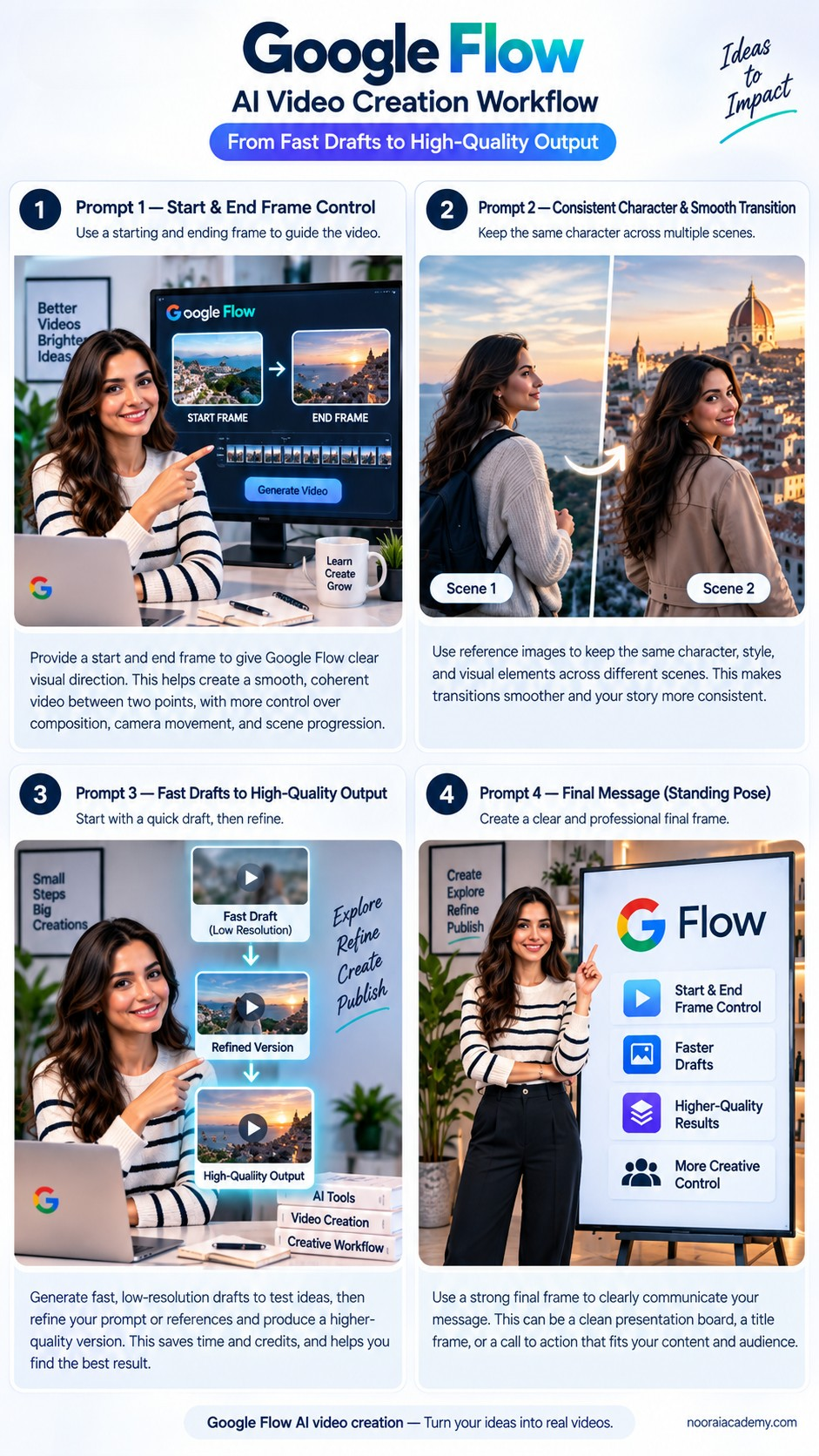
Google Flow AI video creation is becoming a practical way for creators to move from quick ideas to more polished video results. Instead of generating one clip and hoping it works, Flow gives creators a workspace for experimenting, refining scenes, and building a more structured creative process.
For content creators, educators, researchers, and digital professionals, this approach can make AI video production more organized. You can test an idea, review the result, adjust the scene, and then invest in a higher-quality version.
Watch our short Google Flow demonstration: Google Flow AI Video Creation on YouTube
What Is Google Flow?
Google Flow is an AI-powered creative environment designed for generating and developing visual content. Rather than treating every AI-generated clip as an isolated result, Flow supports a more iterative process. Creators can experiment with prompts, reference images, different scenes, and visual directions before deciding which version deserves further refinement.
This makes Google Flow AI video creation especially useful for people who want more control than a simple text-to-video generator provides. The goal is not necessarily to replace traditional video editing software. Instead, Flow can help generate the visual material that later becomes part of a larger editing workflow.
1. Fast Drafting and Experimentation
One of the biggest challenges in AI video generation is iteration. A creator may have a strong idea but still need several attempts before the camera movement, composition, atmosphere, or subject looks right.
Generating every experiment as a final-quality video can waste both time and credits. A more efficient workflow is:
- Start with an idea
- Create a quick draft
- Review the result
- Adjust the prompt or visual references
- Generate another version
- Refine the strongest result
- Produce the final output
This draft-first approach makes experimentation less expensive and encourages creators to test more ideas before choosing the final direction. For creators, Google Flow AI video creation can therefore be useful not only for generating clips, but also for rapid visual prototyping.
2. Frames to Video
Frames to Video provides more visual direction than a text prompt alone. A creator can begin with a reference frame and use it as the foundation for a moving sequence. Depending on the available model and workflow, reference frames can help establish how a scene begins or how the visual composition should develop.
This is useful when you already have an AI-generated image, a concept frame, product photography, character artwork, a storyboard image, or another visual reference. Instead of asking the AI to invent everything from zero, the reference gives the generation process a clearer starting point.
3. Ingredients to Video
Visual consistency is one of the biggest difficulties in generative video. Characters, objects, clothing, environments, and visual styles can change between generations.
Ingredients to Video helps address this problem by allowing creators to work with reference materials that represent important elements of the scene. This can be useful when a project needs greater consistency across multiple clips, such as the same character, product, environment, clothing, or visual style.
4. Scene Builder and Video Extension
A complete video usually requires more than one generated clip. That is where scene-building tools become useful. Instead of thinking, “Generate one perfect video,” a better approach is to build several useful shots and combine them into a sequence.
Scene Builder can help creators think in terms of connected scenes rather than individual generations. Video extension can also help continue an existing visual sequence beyond its original duration.
Shot → Scene → Sequence → Final edit
5. More Control Over the Creative Process
AI video generation is most useful when the creator remains involved. A first generation may look impressive but still have problems with camera positioning, facial consistency, object placement, motion, lighting, visual continuity, pacing, or composition.
A structured workflow allows the creator to evaluate each result and make deliberate changes. The strongest results usually come from a combination of human direction + AI generation + manual review.
6. A Practical Google Flow Workflow
A practical Google Flow AI video creation workflow could look like this:
- Define the purpose of the video.
- Write a simple scene concept.
- Generate an initial draft.
- Review the composition and motion.
- Adjust the prompt or reference images.
- Create alternative versions.
- Select the strongest shots.
- Extend or organize scenes where necessary.
- Generate the higher-quality version.
- Finish the project in a video editor if additional editing is required.
Final editing can still be done in tools such as CapCut, DaVinci Resolve, Adobe Premiere Pro, or another preferred editor. This hybrid workflow is often more practical than expecting one AI platform to perform every production task.
7. Who Can Benefit From Google Flow?
Content Creators
Creators can experiment with YouTube Shorts, Instagram Reels, storytelling videos, promotional clips, visual hooks, and AI-generated B-roll.
Educators
Teachers and educators can create conceptual visuals for lessons, presentations, and educational content.
Researchers and Academics
Researchers may use generated visuals for science communication, conference presentations, research outreach, educational explanations, and social media communication. AI-generated scenes should not be presented as real experimental evidence, but they can be useful for clearly labeled explanatory or illustrative material.
Marketing Professionals
Marketing teams can use AI video for early campaign concepts, visual experimentation, storyboarding, and social content.
8. Vertical Video and Social Media
Modern creators increasingly design content for vertical platforms. Short-form video dominates many mobile-first channels, including YouTube Shorts, Instagram Reels, and TikTok-style formats.
Creators should think about vertical framing, subject placement, readable on-screen text, strong opening seconds, and mobile viewing. Generating beautiful visuals is only one part of the process; the content must also fit the platform where it will be published.
Limitations to Keep in Mind
Google Flow AI video creation is powerful, but it should not be treated as a completely automatic production system. AI-generated video can still produce inconsistencies.
Always review faces, hands, text inside the scene, object shapes, movement, lighting, continuity, and transitions. Complex scenes may require multiple attempts.
Creators should also monitor generation credits and avoid producing final-quality versions before they are satisfied with the basic concept. Another important consideration is transparency: when AI significantly generates or alters visual or audio content, creators should follow the disclosure requirements of the platform where the content is published.
A Better Way to Think About AI Video
Instead of asking, “Can AI create my entire video?”, ask: “Which parts of my video workflow can AI make faster?”
AI may be especially useful for concept visualization, storyboarding, B-roll, establishing shots, transitions, visual experimentation, social media clips, and rapid prototyping.
This approach keeps creative direction in human hands while allowing AI to accelerate repetitive or expensive stages of production.
Final Thoughts
Google Flow represents an important development in AI-assisted video production because it encourages a workflow based on experimentation rather than one-click generation.
The real advantage is the ability to move through a process: Idea → Draft → Review → Refine → Higher-quality output.
For students, educators, researchers, creators, and digital professionals, this makes Google Flow worth exploring. The best results are unlikely to come from asking AI to make everything automatically. They will come from combining AI speed with human judgment, creative direction, and careful review.
Useful Resources
Related reading: The Five Giants of AI: How Tech Titans Shape the Future