

Canva AI 2.0 prompts can now do much more than generate a quick image or write a short paragraph. Canva is moving toward a conversational, agentic workspace where research, design, data, publishing, and automation can be connected inside one creative environment.
For Noor AI Academy, the most useful question is not simply, “What can Canva AI generate?” It is: Can Canva help a student, researcher, educator, or creator move from an idea to a usable result faster without losing human control? This guide tests that idea with three practical prompt workflows for research, design, and automation.
What Is Canva AI 2.0?
Canva announced Canva AI 2.0 in 2026 as a major shift toward conversational creation. According to Canva, the new system can generate fully layered, editable designs from a prompt and continue helping as the user refines the work. Canva also introduced workflows for connectors, scheduling, web research, Brand Intelligence, Sheets AI, and Canva Code 2.0.
Important: Canva AI 2.0 launched as a research preview and features can roll out gradually. Your account may not show every capability at the same time, so check what is available before building a workflow around a specific feature.
Why This Matters for Research and Content Work
The biggest change is that research and design no longer have to be completely separate tasks. Canva says its web research workflow can gather and structure information from the web and place it into editable visual content. Its new design model also aims to keep generated elements editable rather than locking the result into a flat image.
- Students: research a topic and turn findings into study visuals or presentations.
- Researchers: convert a research brief into a visual summary, presentation, or educational content.
- Educators: create teaching materials from a structured lesson brief.
- Content creators: move from research to multiple platform formats without rebuilding the same idea from zero.
- Digital teams: use connectors and scheduling to reduce repetitive content tasks.
Watch Canva AI in Practice
This short demonstration shows Canva AI being used for research, content creation, editing, refinement, and scheduled tasks—some of the same workflow ideas explored in the practical prompts below.
A Simple Canva AI Prompt Framework
For better results, use five parts: Goal + Context + Sources + Deliverable + Review.
- Goal: What are you trying to achieve?
- Context: Who is the audience and why does the content matter?
- Sources: What information should Canva use or prioritize?
- Deliverable: What should it create?
- Review: What must be checked before the result is used?
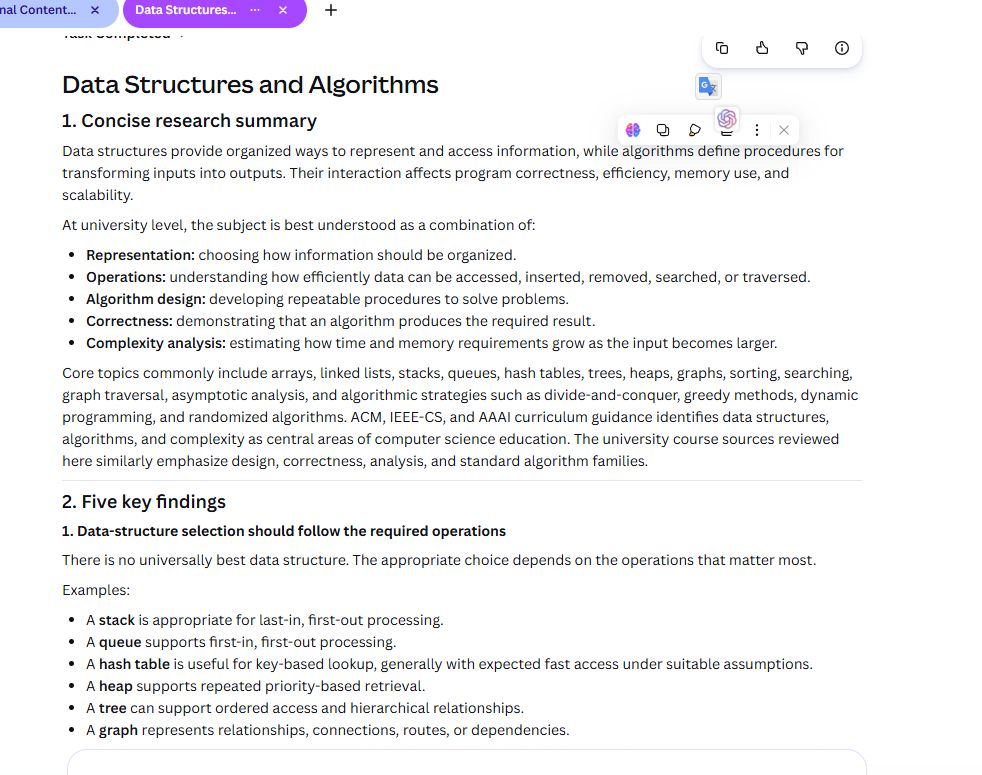
Prompt 1: Research a Topic and Build a Visual Brief
Use case: students, postgraduate researchers, educators, and content creators who need a fast first research brief before designing.
Act as a research and visual communication assistant.

TOPIC:
[Insert topic]

AUDIENCE:
University students, postgraduate researchers, and academics.

TASK:
Research the topic using reliable and current web sources. Prioritize official organizations, universities, primary sources, and authoritative documentation where appropriate.

OUTPUT:
1. A concise research summary.
2. Five key findings.
3. A section called “What Still Needs Verification”.
4. Source links for time-sensitive claims.
5. A visual brief for a 6-slide educational presentation.
6. One suggested chart, diagram, or visual explanation if the evidence supports it.

DESIGN DIRECTION:
Clean, academic, modern, readable, and suitable for university audiences.

BOUNDARIES:
Do not invent statistics, references, quotations, or study findings.
Do not present uncertain information as confirmed.

REVIEW:
Before finishing, check that every important factual claim is supported by a source and that the visual brief does not oversimplify the research.
Why it works: the prompt separates research from visual production. Instead of asking Canva to make a beautiful presentation immediately, you first ask it to organize the evidence and explicitly mark uncertainty.
Prompt 2: Turn Research Into a Multi-Platform Content Package
Use case: turning one reliable topic into coordinated content for a website and social platforms.
Turn the research brief below into a coordinated educational content package.

SOURCE MATERIAL:
[Paste or attach the approved research brief]

AUDIENCE:
Students, researchers, academics, educators, and AI-interested professionals.

CREATE:
1. A 7-slide Instagram carousel.
2. A 60-second vertical video storyboard.
3. A LinkedIn post.
4. A Pinterest pin concept.
5. A simple featured-image concept for a related article.

DESIGN RULES:
Keep the visual hierarchy clear.
Use short, mobile-friendly text.
Keep every design editable.
Do not add decorative elements that make the information harder to read.

CONTENT RULES:
Do not change the meaning of the research.
Do not invent statistics or citations.
Do not copy the exact same wording across platforms.
Adapt the message to each format.

FINAL CHECK:
List any statement that still requires human fact-checking before publication.
Practical lesson: this is where Canva becomes more than a design tool. The same approved source can become several platform-specific assets while the user still controls the final edit.
Example Source Material
For this workflow, Canva AI was given an approved research brief as the source material. The brief summarized the topic, core ideas, key points, practical workflow, and limitations before any visual content was created.
Using an approved brief helps reduce factual drift and keeps the generated content aligned with the original research message.
See the Carousel on Instagram
See the full 7-slide carousel on Instagram: View the Instagram post.
Prompt 3: Create a Safe Weekly AI Content Workflow
Use case: Canva AI 2.0 scheduling and web research, when those capabilities are available on your account.
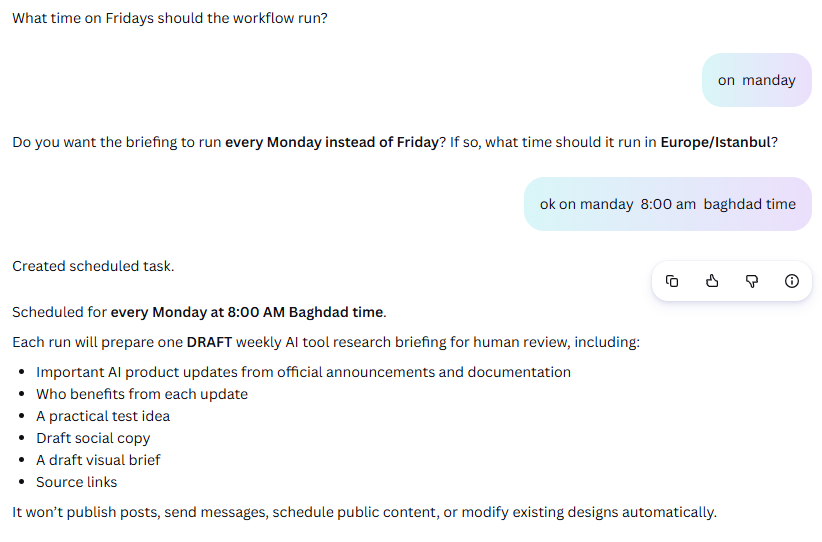
Create a weekly AI tool research workflow for an educational website.

GOAL:
Identify important AI product updates that could genuinely help students, researchers, academics, or digital professionals.

SCHEDULE:
Run once every Friday.

RESEARCH RULES:
Prioritize official product announcements and documentation.
Ignore minor interface changes, hype, and unsupported rumors.

FOR EACH IMPORTANT UPDATE, PREPARE:
1. What changed.
2. Who benefits.
3. A practical test idea.
4. A draft social post.
5. A draft visual brief.
6. Source links.

SAFETY RULE:
DO NOT publish, schedule a public post, send a message, or modify an existing design automatically.
Prepare drafts only for human review.

FINAL OUTPUT:
Create one review-ready weekly briefing labeled DRAFT.
This third prompt is deliberately conservative. Automation should remove repetitive work, not remove editorial control. For a new workflow, draft-only is safer than automatic publishing.
This workflow was configured to prepare a weekly AI research briefing every Monday at 8:00 AM Baghdad time. The output remains in draft form for human review and does not publish, send, or modify content automatically.
What Else Can Canva AI 2.0 Do?
Canva’s 2026 AI direction extends beyond these three prompts. Canva says Sheets AI can generate structured sheets from a description, while Canva Sheets also includes AI-assisted formulas and insights. Canva Code 2.0 is designed for interactive experiences created from conversational prompts. Canva has also introduced connectors that can bring context from services such as Google Drive, Gmail, Slack, Notion, Zoom, Microsoft tools, and others into supported workflows.
These features can be powerful, but they also make source control and review more important. When a tool can research, generate, connect to external information, and schedule work, the user should clearly define what the AI is allowed to do and what requires approval.
Common Mistakes to Avoid
- Starting with design before checking facts. Attractive visuals do not make uncertain information reliable.
- Using vague prompts. Define the audience, deliverable, source expectations, and review rules.
- Publishing automated outputs immediately. Begin with draft-only workflows until the process is proven.
- Assuming every feature is available. Canva AI 2.0 features may vary by account, plan, region, or rollout stage.
- Overloading one design. Good educational design still needs hierarchy, whitespace, and readable text.
Is Canva AI 2.0 Worth Testing?
Yes, especially if your work already moves between research, presentations, social content, data, and visual communication. The strongest reason to test Canva AI 2.0 is not one isolated AI feature. It is the possibility of moving through more of the workflow in one place while keeping the final output editable.
For researchers and educators, the best starting point is a low-risk task: research a non-sensitive topic, generate a visual brief, inspect the sources, and manually refine the design. For creators, start with one approved source and test whether Canva can adapt it into several useful formats without losing accuracy or brand consistency.
Final Thoughts
Canva AI 2.0 points toward a different kind of creative workflow: research → structure → design → adapt → review → automate carefully. The technology can make the process faster, but the quality still depends on the brief, the sources, and the human review.
The three prompts above are designed as starting points. Test them, refine them for your own field, and keep publication decisions under human control.
Official Canva Resources
Related reading: GPT-6 Astra Prompts: 3 Practical Workflows for Research and Work and Google Flow AI Video Creation.


Comments 2